

To the Spreadsheet and Beyond (Part 2)
The spreadsheet remains a vital tool for business, but c-store technology extends the concept considerably.
The First Spreadsheet Software
When we left off in Part One, the Seventies were coming to a close. Harvard Business School student Dan Bricklin dreamed of a “magic” calculating blackboard. He worked with Bob Frankston to come up with the first functioning spreadsheet software: VisiCalc (Visible Calculator). Built for the Apple II computer, it put that machine on the map: consumers would buy the hardware just to run the software.
The core operational design of today’s electronic spreadsheets remain more or less unchanged from the days of VisiCalc. Here’s how the software takes calculations out of the hands of the user and works behind the scenes to product the numbers that display on the grid.
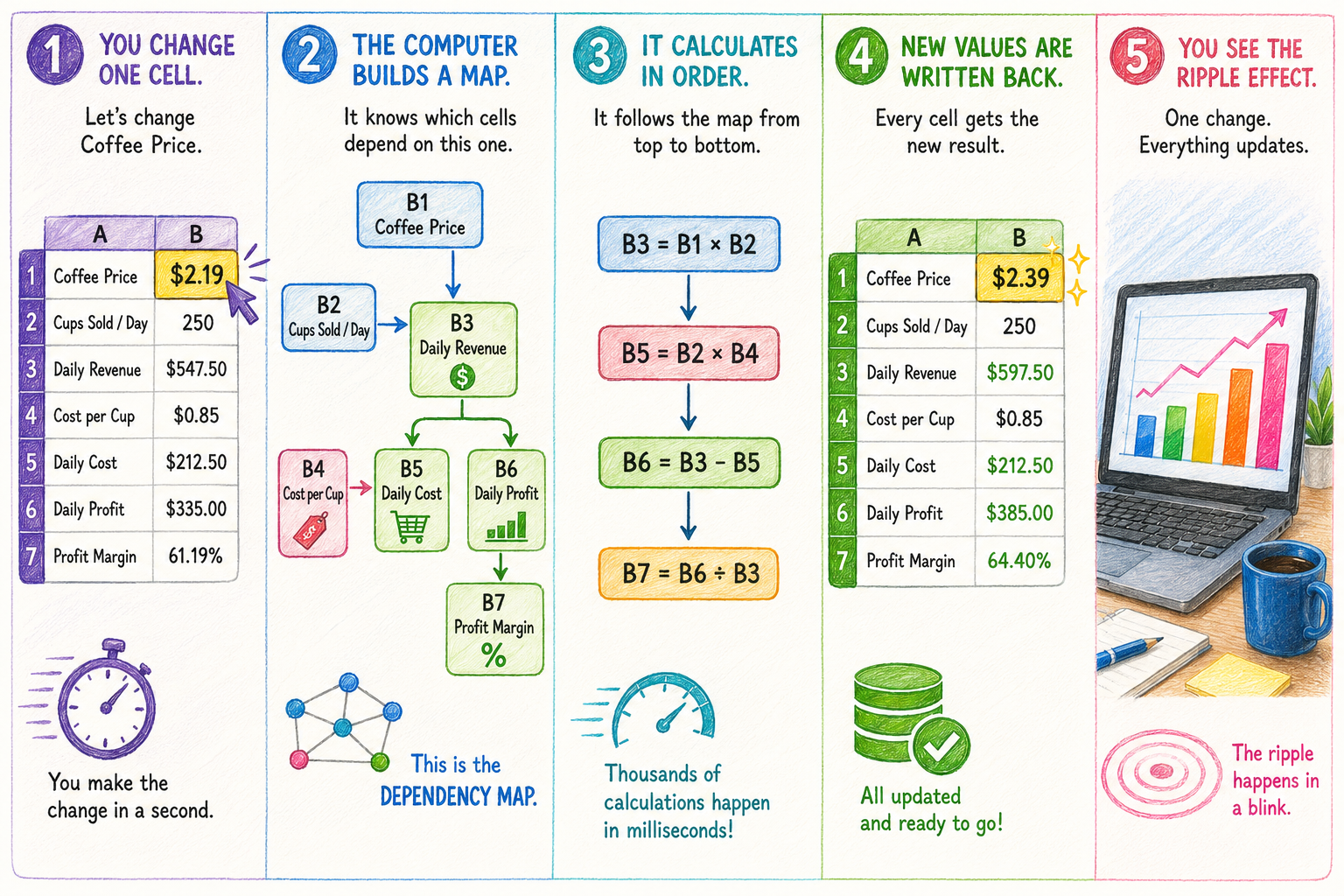
The Spreadsheet Evolves
While essential spreadsheet functionality hasn’t changed, the software’s ability to address the needs of a business has improved continually.
Lotus 1-2-3
Lotus 1-2-3 came out of the box in 1983, positioning itself as a business tool. It rapidly became widespread, helped by the fact that it was designed for IBM PCs dominating the corporate business market at the time.
It was faster than VisiCalc, but enhanced its spreadsheet functionality (1!) , by adding charts and graphs (2!), and a bit of database management (3!). Lotus 1-2-3 was actually the standard business application on IBM-compatible computers in the mid 1980’s. It didn’t last.
Microsoft Excel
Today’s market leader, to the point that the name has become synonymous with “spreadsheet,” Microsoft Excel debuted first for the Macintosh in 1985 and then for Windows in 1987. Ease of use was the appeal.
Typed commands were replaced with pull-down menus, icons, and point-and-click editing. Excel also expanded worksheet size, improved charting, supported multiple worksheets within a workbook, and eventually incorporated powerful functions, pivot tables, and automation through Visual Basic for Applications (VBA).
Hot, then Not
Though our above two examples dominate the history of the spreadsheet, two other products emerged for a very brief period, before disappearing for good.
SuperCalc (1980) was developed for the pre-DOS operating system called CP/M that became popular after the launch of the IBM PC, particularly because it wasn’t tied to Apple hardware like VisiCalc. It was command-line-based though, so it quickly became obsolete.
Quattro Pro (1988) was developed by a now defunct company called Borland[1] that for a brief few years made a run at being a competitor to Microsoft, leading with this spreadsheet. It developed a niche following, but never displaced Excel.
About that Back Office System…
While spreadsheets have gotten faster and more powerful, they haven’t eliminated their essential drawback: a human has to enter the information and devise the formulas they want calculated. The bigger and more complex the business, the bigger and more complex these tasks get. A retailer can spend a lot of time updating data and formulas. Not to mention it is quite difficult to proactively spot problems in flat sheets of data.
Limitations like these can be addressed, however, by the kind of modern back office software that includes our Computerized Daily Book (CDB), designed for convenience stores. Where numbers and values are concerned, it reduces manual intervention and human error to the barest minimum.
The back office automatically collects and stores live operational data, such as information from the point-of-sale (POS), delivery scanned data, inventory adjustments, and fuel readings.
Going one step further, the CDB gets all this information into reports and analyses, and can provide timely projections and warnings. A user doesn’t have to construct formulas, and, anyway, the CDB’s approach to calculations has depth and scope beyond those of a spreadsheet.
That being said, in an effort to provide as much flexibility as we can to our users, information from most CDB reports can be exported into a popular spreadsheet format. Our software accepts data from a variety of file formats, too. The goal is to get our customers spending less time managing data and more time running a business. Give us a call at (800) 972-7727 and we’ll tell you how it works.
[1] In Scotts Valley, about a 45-minute drive from SSCS headquarters.





Leave A Comment